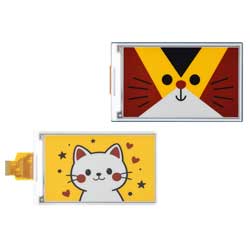



4.26inch e-Paper (G) 使用教程
产品特性
- 无需背光,断电可长时间保持最后一屏的显示内容
- 功耗非常低,基本只在刷新时耗电
- 提供完善的配套资料手册:驱动板原理图、Raspberry Pi / Jetson Nano / Arduino / STM32 / ESP32 等示例程序
- 以下仅适用于模块版
- 基于 Raspberry Pi 40PIN GPIO 接口设计,适用于 Raspberry Pi、Jetson Nano
- 预留 SPI 通信接口,方便接入 Raspberry Pi / Arduino / STM32 / ESP32 等主控板
- 板载电平转换芯片,可兼容 3.3V 和 5V 电平接口
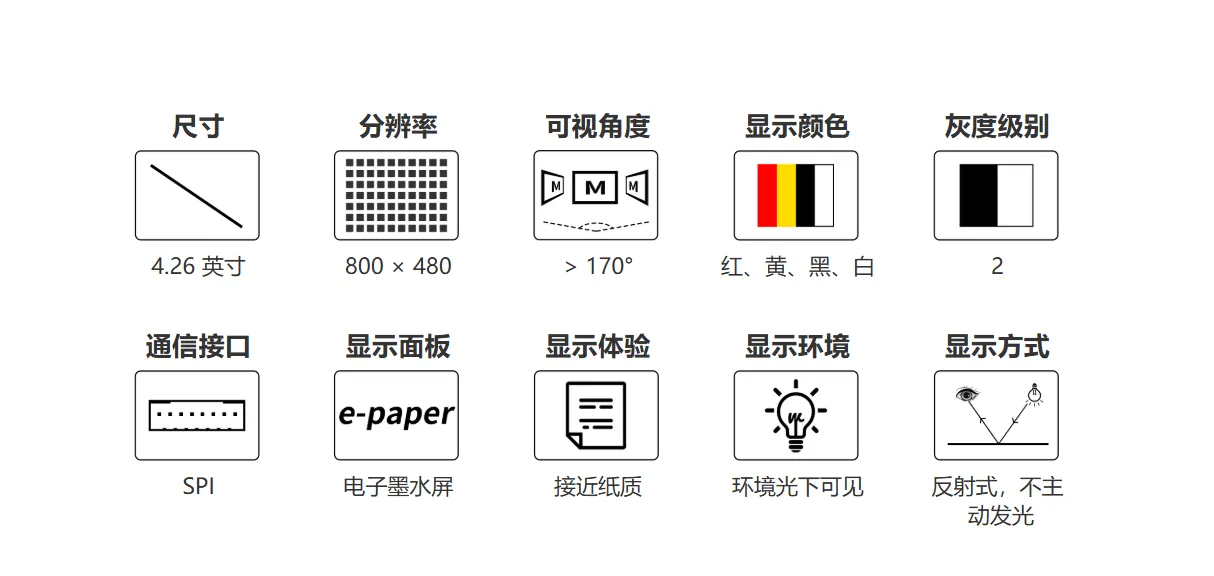
各项参数
| 参数名称 | 参数 |
|---|---|
| 工作电压 | 裸屏版:3.3V 模块版:3.3V/5V |
| 通信接口 | 3-wire SPI、4-wire SPI |
| 外形尺寸 | 裸屏版:105.33 × 62.37 × 0.91 (mm) 模块版:107.00 × 64.00 (mm) |
| 显示尺寸 | 92.80 × 55.68 (mm) |
| 点距 | 0.116 × 0.116 (mm) |
| 分辨率 | 800 × 480 pixels |
| 显示颜色 | 红、黄、黑、白 |
| 灰度等级 | 2 |
| 全局刷新 | 20s |
| 刷新功耗 | < 90mW |
| 休眠电流 | < 0.01uA (接近 0) |
| 可视角度 | > 170° |
- 刷新时间:刷新时间为实验测试数据,实际刷新时间会有误差,以实际效果为准。全局刷新过程中会有闪烁效果,这个是正常现象。
- 刷新功耗:功耗数据为实验测试数据,实际功耗由于驱动板的存在和实际使用情况不同,会有一定误差,以实际效果为准。
- 在低温环境下进行刷新可能出现显示偏色,需要在 25℃的环境中静止 6 小时后,在进行刷新。
通信方式
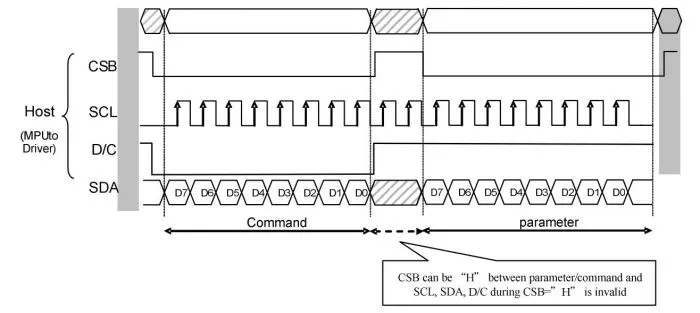
- CSB(CS):从机片选信号,低电平有效,为低电平的时候,芯片使能。
- SCL(SCK/SCLK):串行时钟信号。
- D/C(DC):数据/命令控制信号,低电平时写入命令(Command);高电平时写入数据(Data/parameter)。
- SDA(DIN):串行数据信号。
- 时序:CPHL=0,CPOL=0,即 SPI 模式 0。
- 【备注】具体关于 SPI 通信的相关信息,可以自行网上搜索资料了解。
工作原理
本产品使用的电子纸采用“微胶囊电泳显示”技术进行图像显示,其基本原理是悬浮在液体中的带电纳米粒子受到电场作用而产生迁移。电子纸显示屏是靠反射环境光来显示图案的,不需要背光,在环境光下,电子纸显示屏清晰可视,可视角度几乎达到了 180°。因此,电子纸显示屏非常适合阅读。
编程原理
对于四色墨水屏,我们可以参照黑白四灰度的图片进行理解,不过还是有写不同 为了节约内存空间、墨水屏对像素进行了压缩: 黑色:对应 00b 白色:对应 01b 黄色:对应 10b 红色:对应 11b 我们拿 4 个像素点来举例:

往寄存器 0x10 中写入数据 0x1B,则将墨水屏中的四个像素点设置成黑、白、黄、红四种颜色
注意事项
- 注意屏幕不能长时间上电,在屏幕不刷新的时候,要将屏幕设置成睡眠模式,或者进行断电处理。否则屏幕长时间保持高电压状态,会损坏膜片,无法修复。
- 使用墨水屏的时候,建议刷新时间间隔至少是 180s, 并且至少每 24 小时做一次刷新,如果长期不使用墨水屏的话,要将墨水屏刷白存放。(具体储存环境需求参考数据手册)
- 屏幕的 FPC 排线比较脆弱,请注意:不要沿屏幕垂直方向弯曲排线,避免排线被撕裂;不要反复过度弯曲排线,避免排线断裂;不要往屏幕正面方向弯曲排线,避免排线与面板的连接断开。调试研发时建议固定排线后使用。
- 墨水屏屏幕较为脆弱,注意尽量避免跌落、碰撞、用力按压。
- 屏幕进入睡眠模式之后,会忽略发送的图片数据,只有重新初始化才能正常刷新。
- 如果发现制作的图片数据在屏幕上显示错误,建议检查一下图片大小设置是否正确,调换一下宽度和高度设置再试一下。
- 墨水屏的工作电压要求是 3.3V,如果您购买的是裸屏的话,设计电路的时候如果需要配合 5V 工作环境的话,建议做一下电平转换处理。
我们建议客户拿到屏幕之后,先用我们提供的示例程序,使用对应的开发板进行测试。
图片处理
- 多色墨水屏的图片制作与转换
图片制作
准备
- 所需软件:Adobe PhotoShop CC、画图
介绍
- Floyd-Steinberg 抖动算法非常适合在颜色数量很少的情况下,展示出丰富的层次感。使得获得更多的颜色组合,对原始图片进行更好的阴影渲染。特别适合电子墨水屏的各种使用场景。
- 以下将介绍如何将普通图片转为 Floyd-Steinberg 散点图。
- 如果你对实际的算法有兴趣,可以了解我们在 ESP32 和 ESP8266 的算法移植。在这里不在赘述。
操作步骤
- 准备工作:将 颜色表 下载到 PC 机,解压得到如下图文件,我们要用到的是
N-color.act或者4-color.act、6-color.act。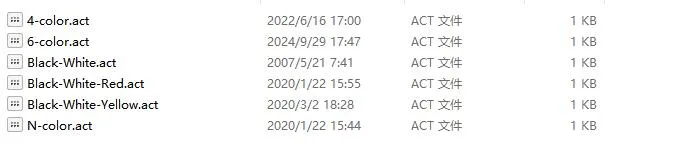
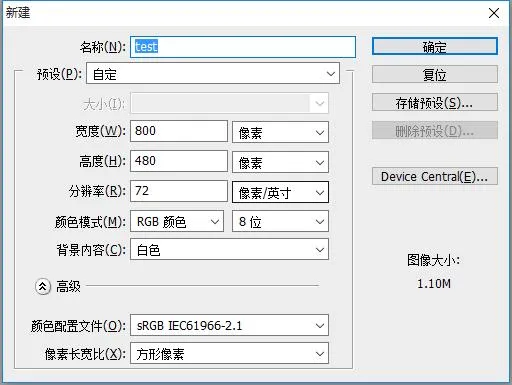
- 新建 Photoshop 工程,按电子墨水屏的实际分辨率设置宽度和高度,颜色模式使用 RGB 颜色。如果使用的屏幕分辨率为 800*480,将宽改为 800 像素,高改为 480 像素即可。
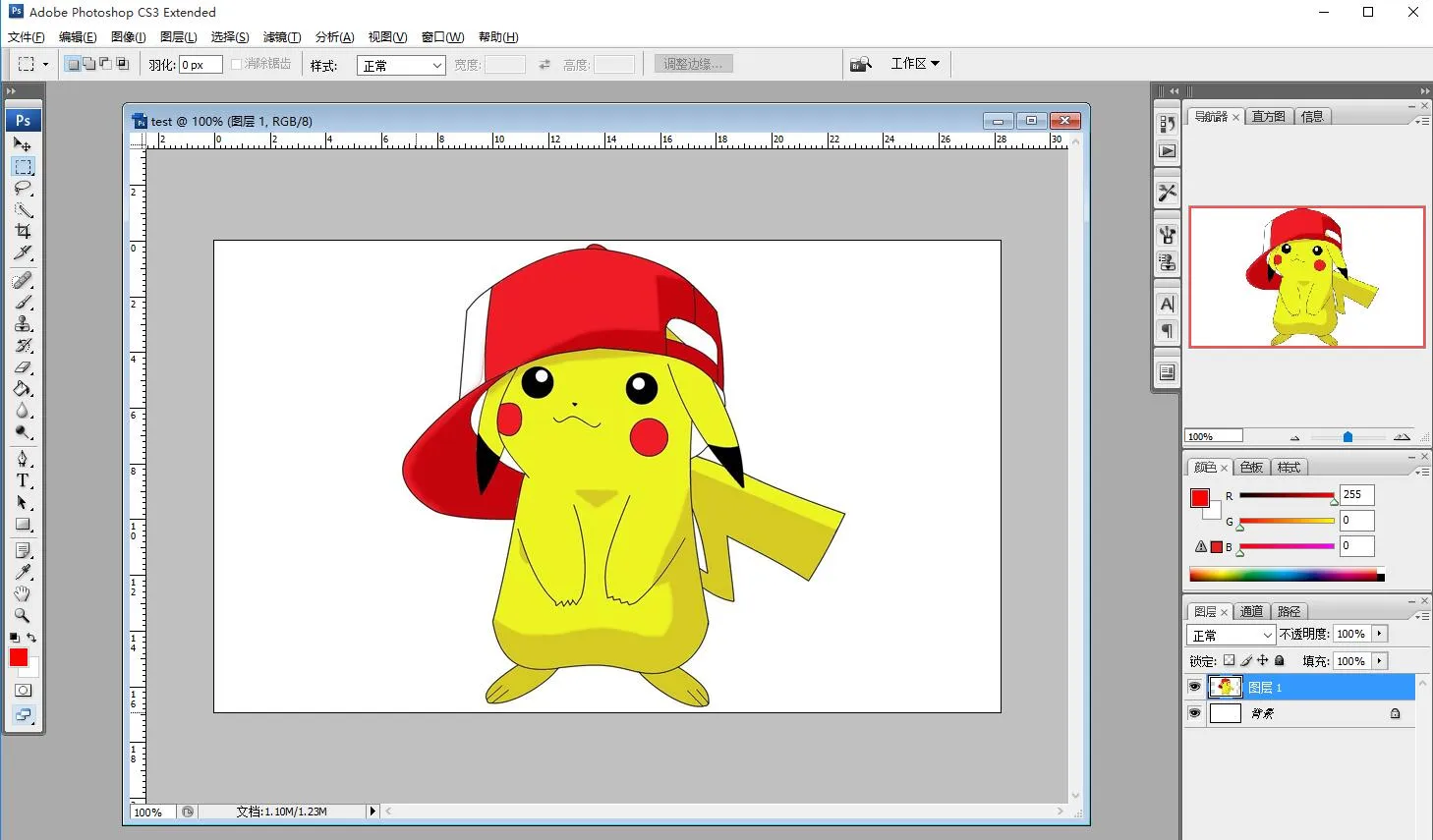
- 准备好相应的素材,复制到工程中,调整好大小、对比度之类的参数(和一般 Photoshop 的处理图片的步骤类似)。
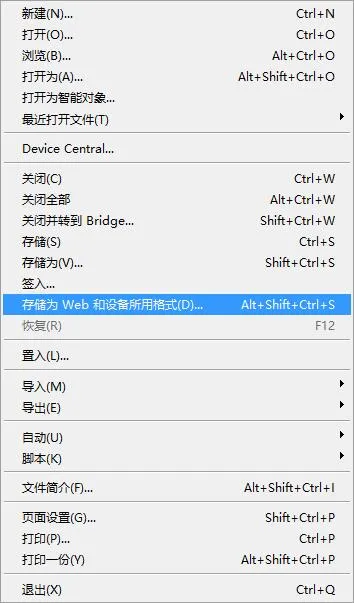
- 选择文件-》存储为 Web 和设备所用格式。
- 如下图选择载入颜色表。载入准备工作中所提供的颜色表。
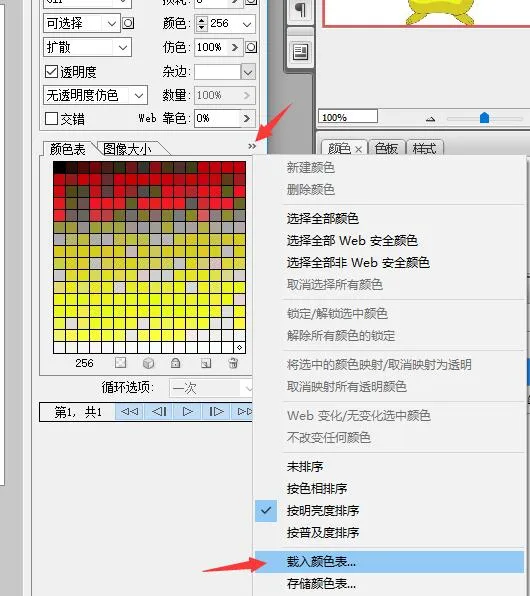
- 对于七色的图片,载入 N-color.act,之后点击存储,保存为 gif 文件即可。然后转换成 BMP 格式即可在本模块上使用。
对于四色的图片,载入 4-color.act,之后点击存储,保存为 gif 文件即可。然后转换成 BMP 格式即可在本模块上使用。
对于六色的图片,载入 6-color.act,之后点击存储,保存为 gif 文件即可。然后转换成 BMP 格式即可在本模块上使用。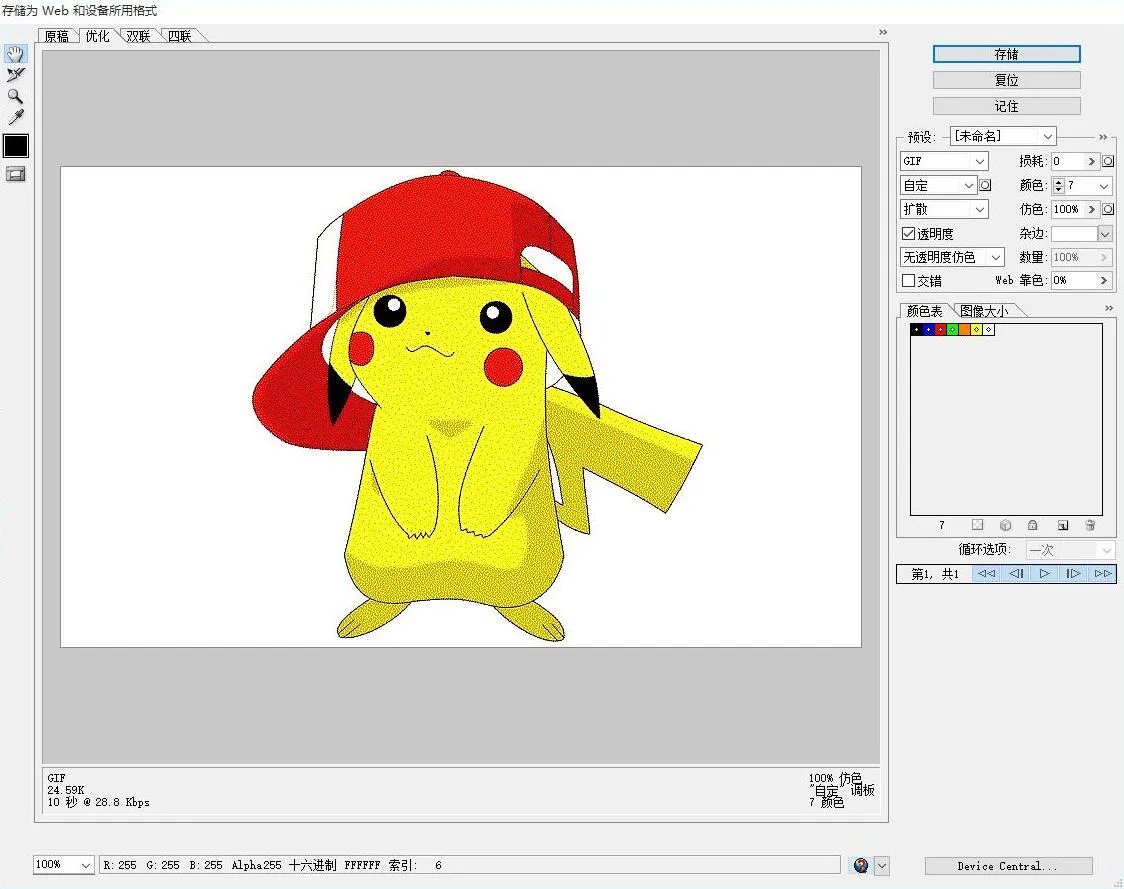
- 使用画图打开 gif 文件,将其另存为为 24 位的 bmp 图片。
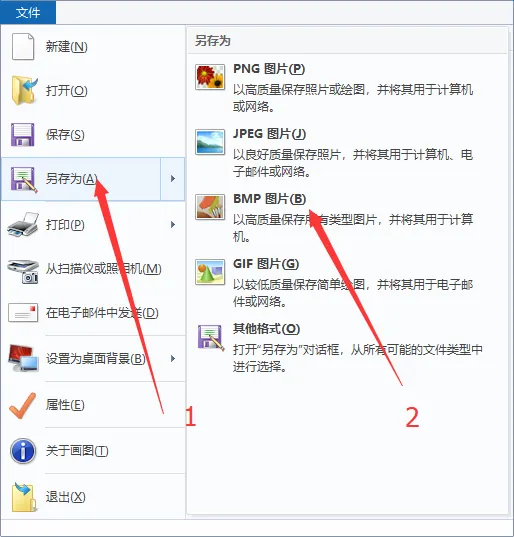

- 至此,图片已经制作完成,可以把它放到树莓派或 e-Paper Shield 模块的 SD 卡中使用,或者参照下一节转换成数组供其他嵌入式设备使用。
- 新建 Photoshop 工程,按电子墨水屏的实际分辨率设置宽度和高度,颜色模式使用 RGB 颜色。如果使用的屏幕分辨率为 800*480,将宽改为 800 像素,高改为 480 像素即可。
图片数据转换
下载程序
- 四色应用程序:四色图片转换应用程序
- E6 全彩应用程序:E6 全彩图片转换应用程序
- 七色应用程序:七色图片转换应用程序
- 源码:程序源码
该应用为方便您的使用友情提供且开源,我司不对其提供技术支持
BUG 解决
- 如果你的电脑是 win10/win11 系统,并且没有安装 VS(Microsoft Visual Studio)或者其他微软的开发工具,在使用本程序时可能出现下面的错误提示
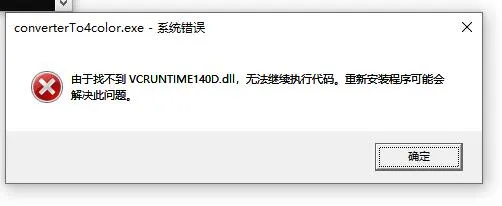
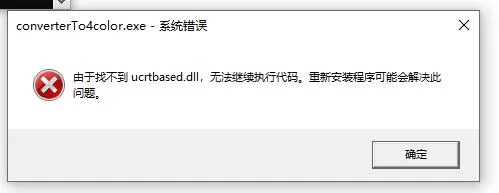
- 这个表示你电脑中缺少这两个组件,解决办法如下
- 1、安装 VS(Microsoft Visual Studio)或者其他微软的开发工具(Visual C++ Redistributable 等)
- 2、使用我们提供的 两个组件文件将这两个文件放到目录
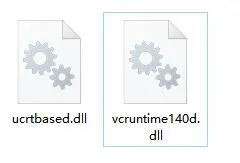
C:\Windows\System32下,然后重启电脑即可
转换步骤
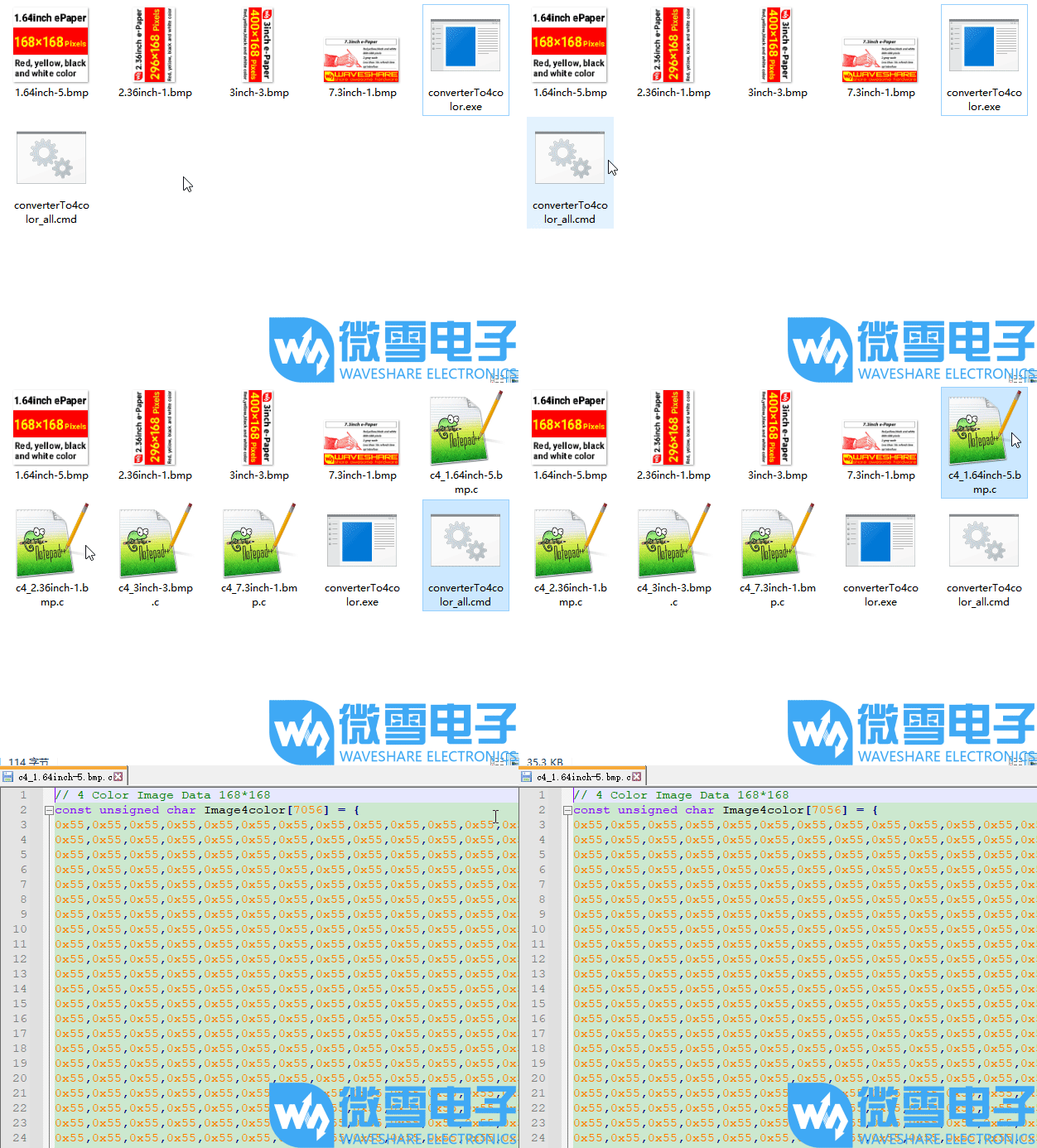
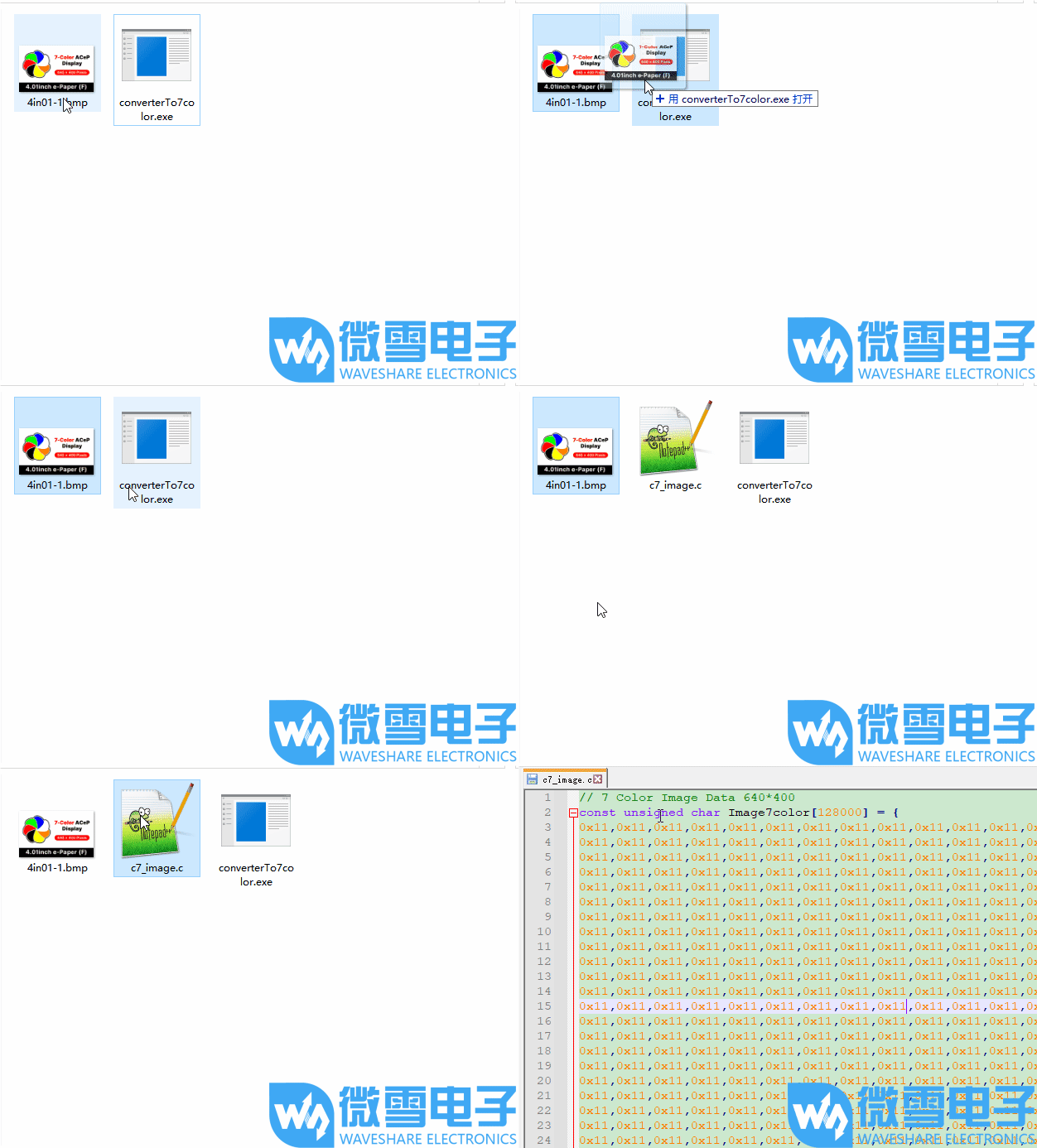
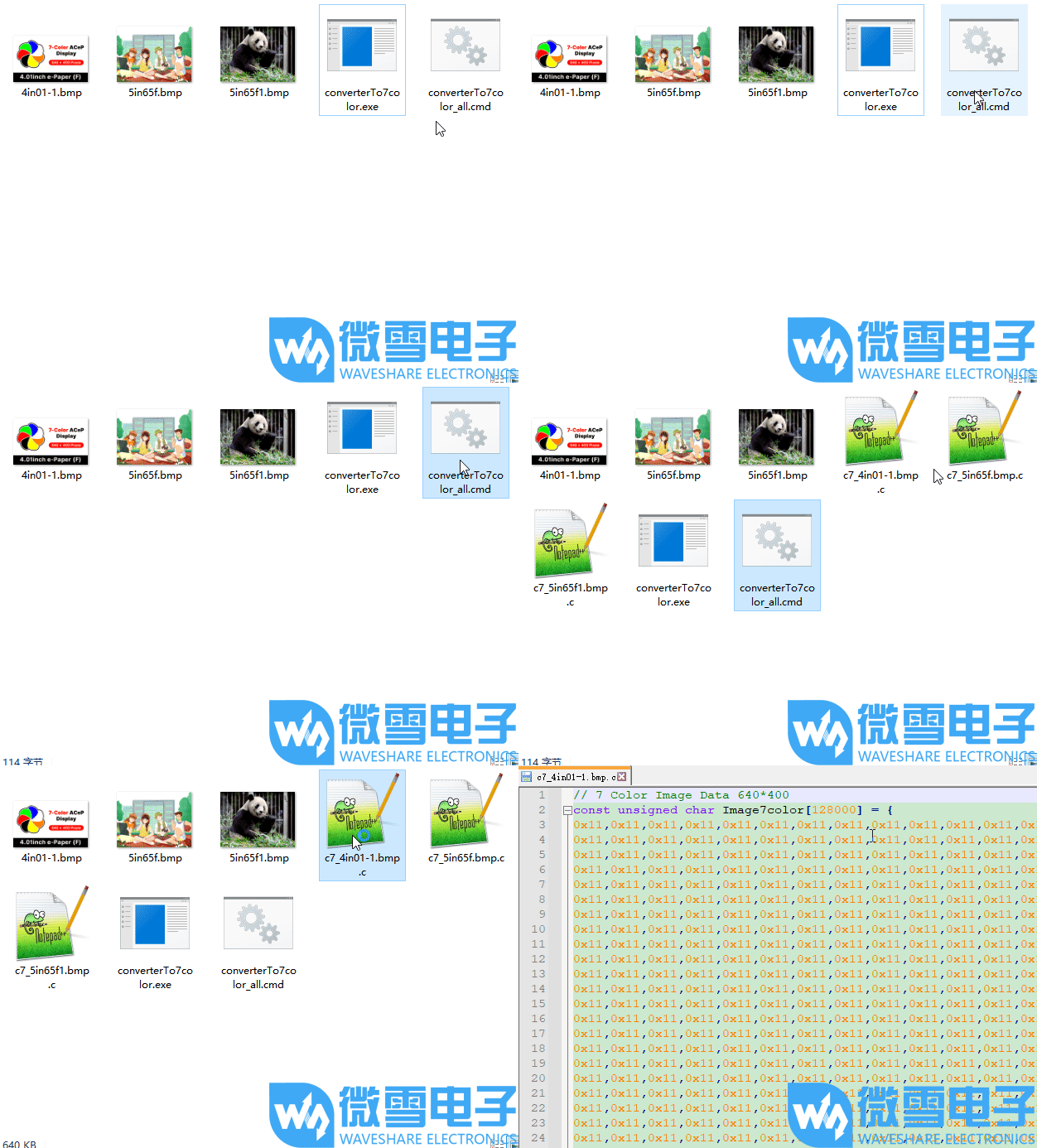
- 将制作好的图片和对应的 exe 应用程序放在同一文件夹,可以同时放入多个图片。
- 将图片拖放到 exe 文件上,程序会把图片转换成固定名称的。c 文件。
- 双击 cmd 文件,程序会把文件夹内的所有符合尺寸的图片转换生成相应名字的。c 文件。
- 四色单张图片演示演示(点击图片,查看演示)
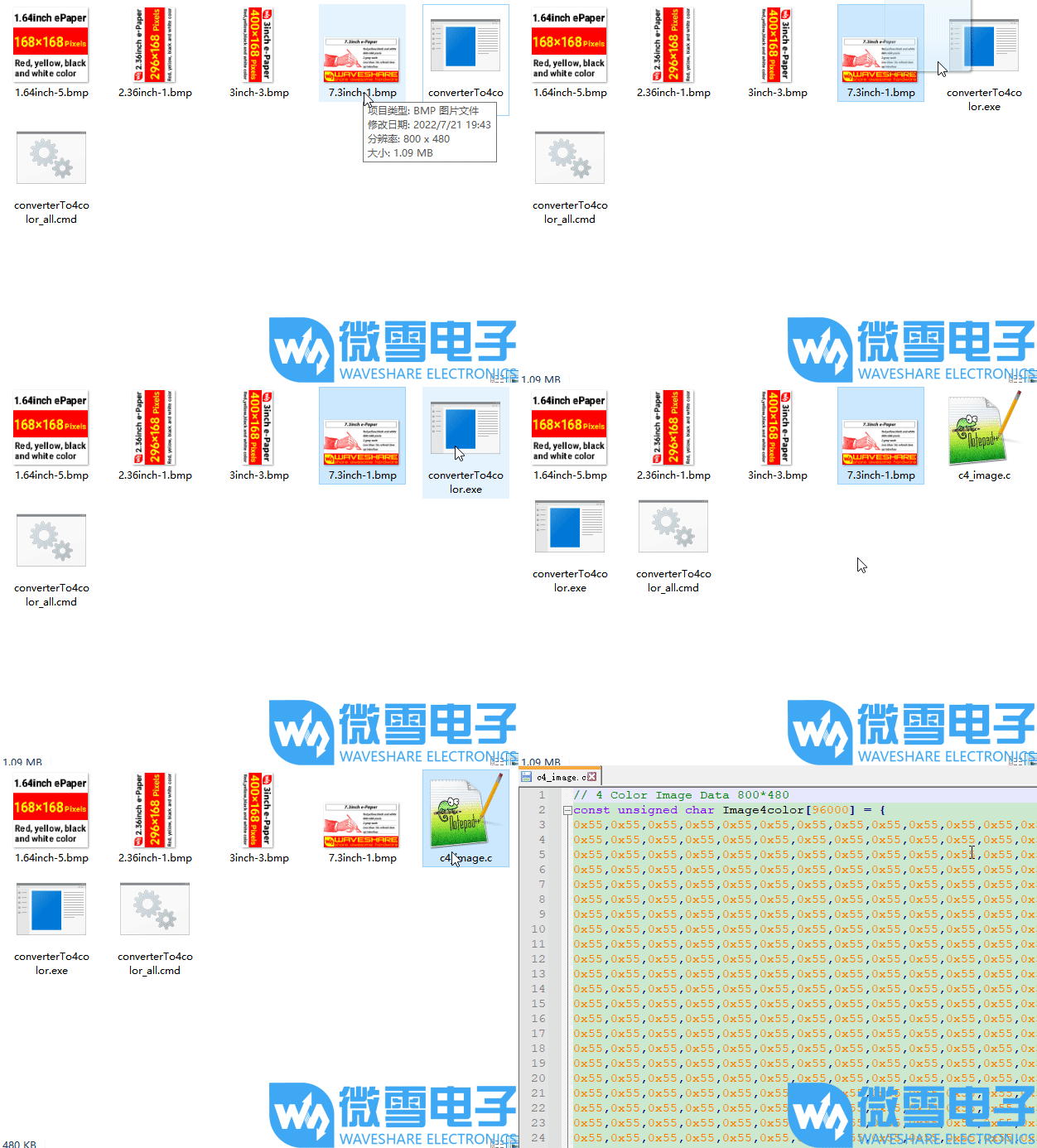
- 四色多张图片演示演示(点击图片,查看演示)
- 七色单张图片演示演示(点击图片,查看演示)
- 七色多张图片演示演示(点击图片,查看演示)
Raspberry Pi 使用说明
硬件连接
- 连接树莓派的时候,可以直接将板子插到树莓派的 40PIN 排针上去,注意对好引脚。
- 如果是选择用 9PIN 排线连接的话,请参考下方的引脚对应表格:
- 树莓派连接引脚对应关系
e-Paper 树莓派连接引脚对应关系 BCM2835 编码 Board 物理引脚序号 VCC 3.3V 3.3V GND GND GND DIN MOSI 19 CLK SCLK 23 CS CE0 24 DC 25 22 RST 17 11 BUSY 24 18 PWR 18 12
- 树莓派连接引脚对应关系
开启 SPI 接口
打开树莓派终端,输入以下指令进入配置界面:
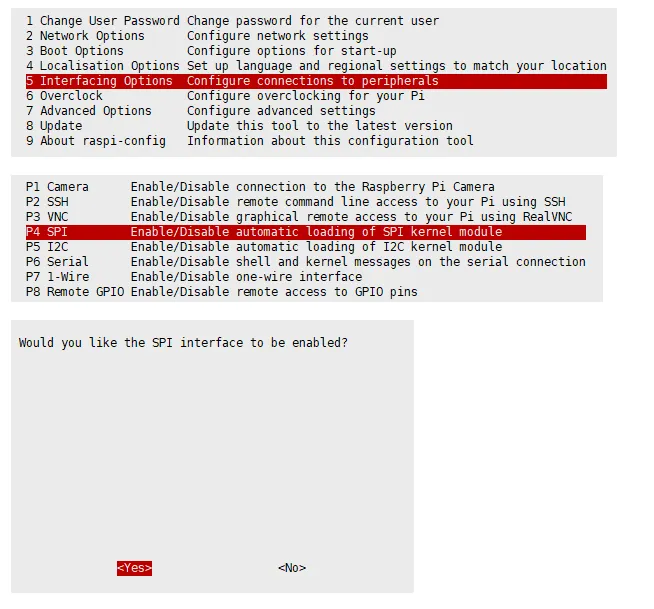
sudo raspi-config选择 Interfacing Options -> SPI -> Yes 开启 SPI 接口
重启树莓派:
sudo reboot检查
/boot/config.txt,可以看到dtparam=spi=on已被写入
为了确保 SPI 没有被占用,建议其他的驱动覆盖暂时先关闭。可以使用
ls /dev/spi*来检查 SPI 占用情况,终端输出/dev/spidev0.0和/dev/spidev0.1表示 SPI 情况正常
运行 C 语言例程
安装 lg 库
#打开树莓派终端,并运行以下指令:wget https://github.com/joan2937/lg/archive/master.zipunzip master.zipcd lg-mastermakesudo make install# 更多的可以参考源码:https://github.com/gpiozero/lg安装 gpiod 库(可选)
#打开树莓派终端,并运行以下指令:sudo apt-get updatesudo apt install gpiod libgpiod-dev安装 BCM2835(可选)
#打开树莓派终端,并运行以下指令:wget http://www.airspayce.com/mikem/bcm2835/bcm2835-1.71.tar.gztar zxvf bcm2835-1.71.tar.gzcd bcm2835-1.71/sudo ./configure && sudo make && sudo make check && sudo make install# 更多的可以参考官网:http://www.airspayce.com/mikem/bcm2835/安装 wiringPi(可选)
#打开树莓派终端,并运行以下指令:sudo apt-get install wiringpi#对于树莓派 2019 年 5 月之后的系统(早于之前的可不用执行),可能需要进行升级:# project-downloads.drogon.net 已停止服务,请使用下面的 GitHub 方式安装# wget https://project-downloads.drogon.net/wiringpi-latest.deb# sudo dpkg -i wiringpi-latest.debgpio -v# 运行 gpio -v 会出现 2.52 版本,如果没有出现,说明安装出错。#Bullseye 分支系统使用如下命令:git clone https://github.com/WiringPi/WiringPicd WiringPi./buildgpio -v# 运行 gpio -v 会出现 2.60 版本,如果没有出现,说明安装出错。下载程序(已下载可跳过)
wget https://www.waveshare.net/w/upload/a/ad/4.26inch_e-Paper_G.zipunzip 4.26inch_e-Paper_G.zip -d 4.26inch_e-Paper_Gcd 4.26inch_e-Paper_G/RaspberryPi_JetsonNano/备用解压方式
git clone https://github.com/waveshare/e-Paper.gitcd e-Paper/E-paper_Separate_Program/4.26inch_e-Paper_G/RaspberryPi_JetsonNano通过 GitHub 下载程序(备用方式,已下载可跳过)
- 目前访问 GitHub 并不是很流畅,建议使用上面的方法从我们官网下载。sudo apt-get install p7zip-full7z x 4.26inch_e-Paper_G.zip -O./4.26inch_e-Paper_Gcd 4.26inch_e-Paper_G/RaspberryPi_JetsonNano/
- 目前访问 GitHub 并不是很流畅,建议使用上面的方法从我们官网下载。
编译程序(说明:-j4 为使用 4 线程编译,数字可自行修改;)
# 此时在 4.26inch_e-Paper_G/RaspberryPi_JetsonNano 位置cd csudo make cleansudo make -j4运行程序
sudo ./epd
运行 python 例程
安装函数库
sudo apt-get updatesudo apt-get install python3-pipsudo apt-get install python3-pilsudo apt-get install python3-numpysudo pip3 install spidev安装函数库(python2)
sudo apt-get updatesudo apt-get install python-pipsudo apt-get install python-pilsudo apt-get install python-numpysudo pip install spidev安装 gpiozero 库(系统默认已安装,如果没有安装请按照以下命令进行安装)
sudo apt-get update# python3sudo apt install python3-gpiozero# python2sudo apt install python-gpiozero下载程序(已下载可跳过)
wget https://www.waveshare.net/w/upload/a/ad/4.26inch_e-Paper_G.zipunzip 4.26inch_e-Paper_G.zip -d 4.26inch_e-Paper_Gcd 4.26inch_e-Paper_G/RaspberryPi_JetsonNano/备用解压方式
sudo apt-get install p7zip-full7z x 4.26inch_e-Paper_G.zip -O./4.26inch_e-Paper_Gcd 4.26inch_e-Paper_G/RaspberryPi_JetsonNano/通过 GitHub 下载程序(备用方式,已下载可跳过)
- 目前访问 GitHub 并不是很流畅,建议使用上面的方法从我们官网下载。git clone https://github.com/waveshare/e-Paper.gitcd e-Paper/E-paper_Separate_Program/4.26inch_e-Paper_G/RaspberryPi_JetsonNano
- 目前访问 GitHub 并不是很流畅,建议使用上面的方法从我们官网下载。
运行程序
# 确保在 4.26inch_e-Paper_G/RaspberryPi_JetsonNano/ 位置cd python/examples/python3 epd_5in0_test.py
Arduino 使用说明
硬件连接
- 使用 9PIN 排线连接,请参考下方的引脚对应表格:
- Arduino 连接引脚对应关系
e-Paper Arduino UNO Mega2560 VCC 5V 5V GND GND GND DIN D11 D51 CLK D13 D52 CS D10 D10 DC D9 D9 RST D8 D8 BUSY D7 D7 PWR D6 D6
- Arduino 连接引脚对应关系
安装 IDE
运行程序
- 在资料界面 下载程序,然后解压进入
4.26inch_e-Paper_G目录可以看到下面的内容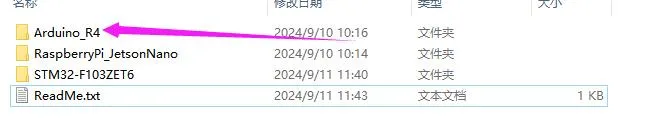
- 打开测试程序:
4.26inch_e-Paper_G\Arduino_R4\Arduino_R4.ino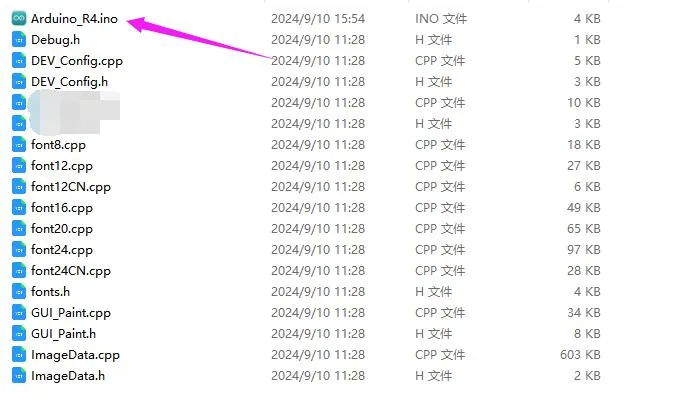
- 在 Arduino IDE 中的工具栏(Tools)选择对应的开发板(Board)和端口(Port)
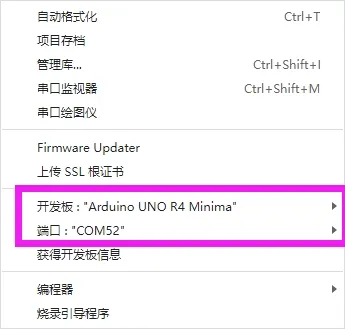
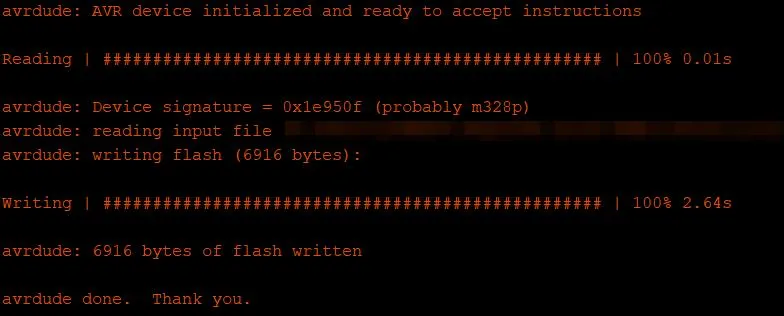
- 最后点击上传即可,上传成功如下(Arduino 1.8.13)
Jetson Nano 使用说明
硬件连接
Jetson Nano 的 40PIN 引脚是兼容树莓派的 40PIN 引脚的,并且提供了一个 Jetson.GPIO 库跟树莓派的 RPI.GPIO 库的 API 是一致的,所以这里连接的序号跟树莓派的是一样的,使用 40PIN 接口时,可以直接将模块插入 Jetson Nano 的 40Pin 排座。
如果是选择用 9PIN 排线连接的话,请参考下方的引脚对应表格:
Jetson nano连接引脚对应关系
e-Paper Jetson Nano Developer Kit BCM2835 编码 Board 物理引脚序号 VCC 3.3V 3.3V GND GND GND DIN 10(SPI0_MOSI) 19 CLK 11(SPI0_SCK) 23 CS 8(SPI0_CS0) 24 DC 25 22 RST 17 11 BUSY 24 18 PWR 18 12
运行 C 语言例程
下载程序(已下载可跳过)
wget https://www.waveshare.net/w/upload/a/ad/4.26inch_e-Paper_G.zipunzip 4.26inch_e-Paper_G.zip -d 4.26inch_e-Paper_Gcd 4.26inch_e-Paper_G/RaspberryPi_JetsonNano/备用解压方式
sudo apt-get install p7zip-full7z x 4.26inch_e-Paper_G.zip -O./4.26inch_e-Paper_Gcd 4.26inch_e-Paper_G/RaspberryPi_JetsonNano/通过 GitHub 下载程序(备用方式,已下载可跳过)
- 目前访问 GitHub 并不是很流畅,建议使用上面的方法从我们官网下载。git clone https://github.com/waveshare/e-Paper.gitcd e-Paper/E-paper_Separate_Program/4.26inch_e-Paper_G/E-RaspberryPi_JetsonNano
- 目前访问 GitHub 并不是很流畅,建议使用上面的方法从我们官网下载。
编译程序(说明:-j4 为使用 4 线程编译,数字可自行修改;)
# 此时在 4.26inch_e-Paper_G/RaspberryPi_JetsonNano 位置cd csudo make cleansudo make JETSON -j4运行程序
sudo ./epd
运行 python 例程
安装函数库
sudo apt-get updatesudo apt-get install python3-numpysudo apt-get install python3-pipsudo pip3 install Jetson.GPIO下载程序(已下载可跳过)
wget https://www.waveshare.net/w/upload/a/ad/4.26inch_e-Paper_G.zipunzip 4.26inch_e-Paper_G.zip -d 4.26inch_e-Paper_Gcd 4.26inch_e-Paper_G/RaspberryPi_JetsonNano/备用解压方式
sudo apt-get install p7zip-full7z x 4.26inch_e-Paper_G.zip -O./4.26inch_e-Paper_Gcd 4.26inch_e-Paper_G/RaspberryPi_JetsonNano/通过 GitHub 下载程序(备用方式,已下载可跳过)
- 目前访问 GitHub 并不是很流畅,建议使用上面的方法从我们官网下载。git clone https://github.com/waveshare/e-Paper.gitcd e-Paper/E-paper_Separate_Program/4.26inch_e-Paper_G/E-RaspberryPi_JetsonNano
- 目前访问 GitHub 并不是很流畅,建议使用上面的方法从我们官网下载。
运行程序
# 确保在 4.26inch_e-Paper_G/RaspberryPi_JetsonNano/ 位置cd python/examples/python3 epd_5in0_test.py
STM32 使用说明
硬件连接
使用 9PIN 排线连接,请参考下方的引脚对应表格:
STM32 连接引脚对应关系
| e-Paper | STM32 |
|---|---|
| VCC | 3.3V |
| GND | GND |
| DIN | PA7 |
| CLK | PA5 |
| CS | PA4 |
| DC | PA2 |
| RST | PA1 |
| BUSY | PA3 |
| PWR | PA6 |
运行程序
- 点击 下载 程序,然后解压进入
4.26inch_e-Paper_G目录可以看到下面的内容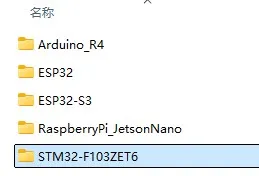
- 使用 Keil 打开 4.26inch_e-Paper_G\STM32-F103ZET6\MDK-ARM 目录下的 epd-demo.uvprojx
- 打开 Keil 的编译工具栏(一般情况已经打开了)
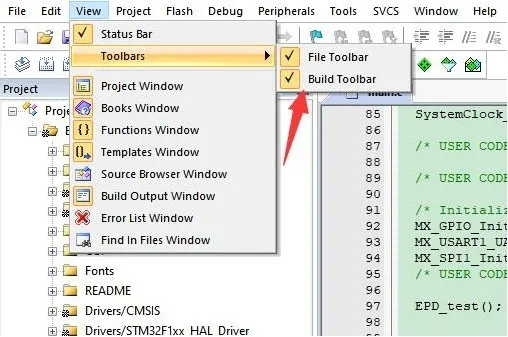
- 点击编译。

- 确保已连接合适的烧录器,然后点击下载(LOAD)将程序下载到单片机中
ESP32 使用说明
硬件连接
ESP32 连接引脚对应关系
| e-Paper | ESP32 | ESP32-S3 |
|---|---|---|
| VCC | 3.3V | 3.3V |
| GND | GND | GND |
| DIN | IO14 | IO11 |
| CLK | IO13 | IO12 |
| CS | IO15 | IO10 |
| DC | IO27 | IO13 |
| RST | IO26 | IO14 |
| BUSY | IO25 | IO4 |
| PWR | IO33 | IO5 |
环境配置
在线安装需要使用翻墙软件,离线安装则无需使用
运行程序
- 在资料界面 下载程序,然后解压进入
5inch_e_Paper目录可以看到下面的内容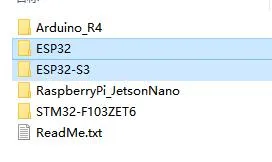
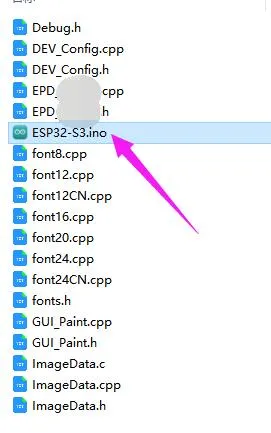
- 打开测试程序:
4.26inch_e-Paper_G\ESP32\ESP32.ino或者4.26inch_e-Paper_G\ESP32\ESP32-S3.ino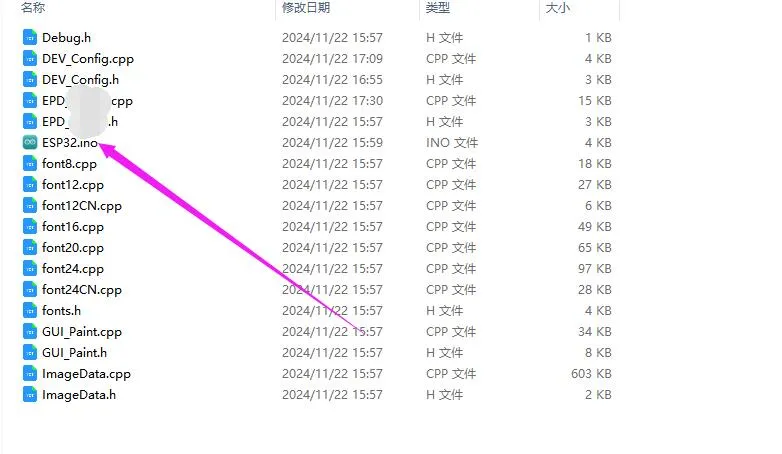
- 在 Arduino IDE 中的工具栏(Tools)选择对应的开发板(Board)和端口(Port)
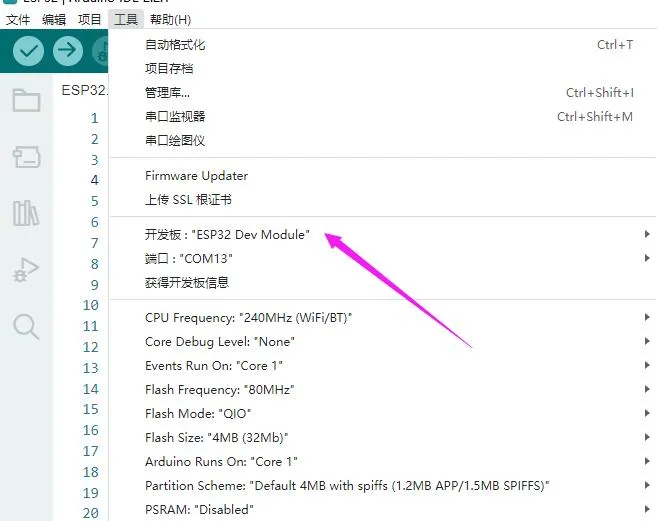
- 如果使用是是 ESP32-S3 之类的带 PSRAM 的核心,请开启 PSRAM
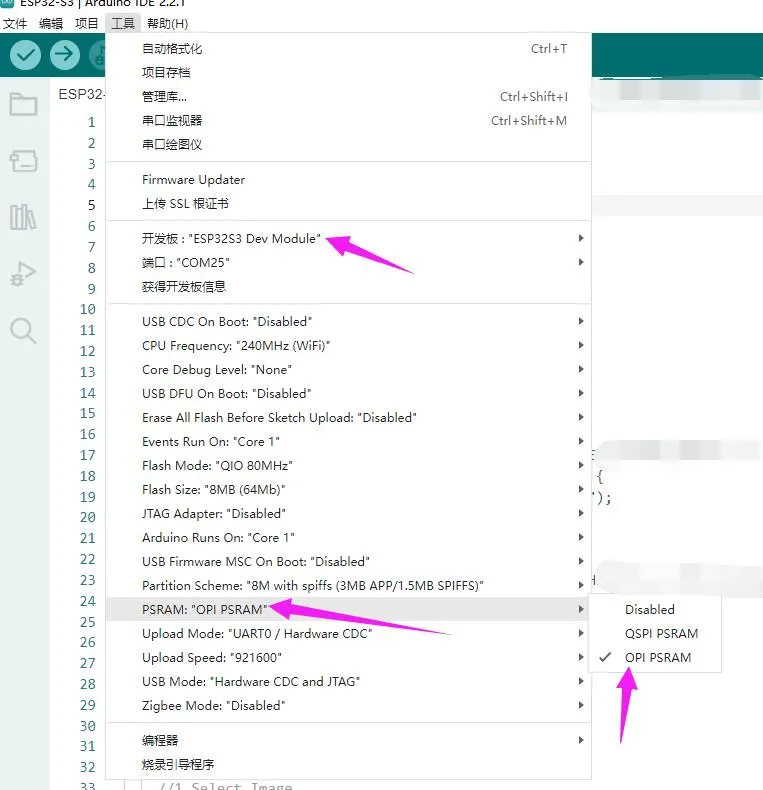
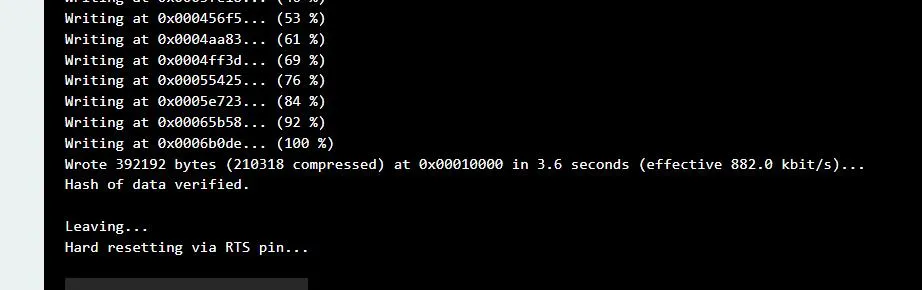
- 最后点击上传即可,上传成功如下(Arduino 2.2.1)
相关资料
1. 硬件资料
驱动板设计文件
2. 技术手册
3. 示例程序
4. 软件工具
5. 其他资料链接
开发资料:
相关链接:
技术支持
周一-周五(9:30-6:30)周六(9:30-5:30)
手机:13434470212
邮箱:services04@spotpear.cn
QQ:202004841